
textPlus: Text Message + Call
textPlusSocial
4.199.27K Reviews
- Version
- 8.3.7
- Installs
- 50.00M
- Age Rating
- Everyone
Screenshots

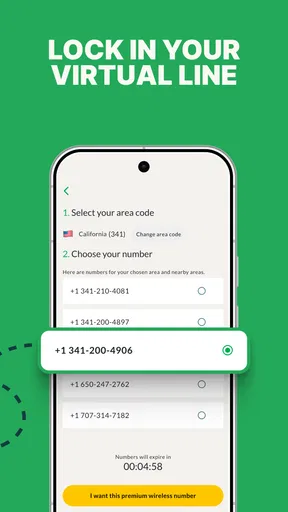

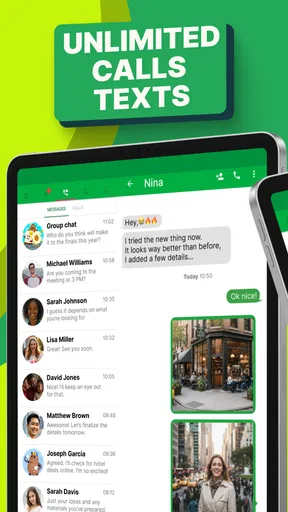
Our Review of textPlus: Text Message + Call
 Analysis by Appyee
For anyone deciding whether to add a second number to their phone, the biggest question is not simply whether an app can send messages. It is whether that extra line will be easy to manage, comfortable to use and dependable enough for the situations that matter. I find textPlus most useful when I treat it as a flexible communication option rather than a complete replacement for a regular mobile plan.
Choosing a second line for everyday tasks
A separate number can make practical sense when you want to keep a short-term project, community activity or casual online contact apart from your main number. For example, I might use one number for coordinating a volunteer event, then keep my personal line for close friends and family. That separation can make incoming conversations easier to sort mentally, even when both numbers live on the same phone.
There is a trade-off: a second number only helps if you remember which line you gave to each person. I’d save the purpose of a contact or conversation clearly, and tell important contacts which number is best for urgent replies. For a temporary task, this can be a tidy solution; for work that requires strict availability or a guaranteed response, I would keep a dependable primary line in the loop.
Readability and navigation in real use
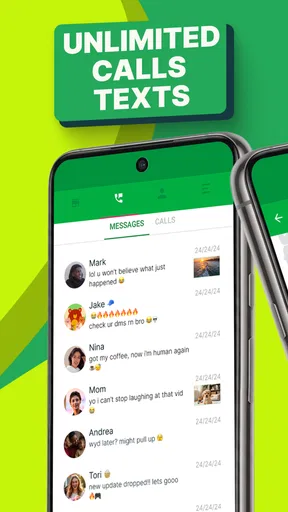
The app is in the social category, but I judge it less like a social feed and more like a communications inbox. That is a useful distinction for anyone who wants to avoid another stream of posts and notifications. Its recent-conversation view gives the experience a familiar starting point, while the visible paths to a new message or call keep basic tasks from feeling buried.
I also value a clear separation between reading a conversation and deciding what to do next. If I’m checking a message while walking between errands, I want to find the thread quickly and return to it later without hunting through unrelated screens. The familiar messaging layout helps, although anyone who relies on larger text or a particular contrast setting should check the app on their own device before making it their main communication method. Comfort can depend on the phone’s display settings and the reader’s needs.
Motor and sensory considerations
Texting and calling offer different ways to communicate, which matters when typing is tiring or inconvenient. A short call may be easier than composing a long reply, while a text can be more comfortable when speaking aloud is difficult or the surroundings are noisy. Group messages can also reduce the repeated effort of sending the same practical update to several people.
That flexibility does not mean every interaction is effortless. Someone with limited dexterity may find repeated small taps frustrating, and a busy group thread can require more careful attention than a one-to-one exchange. I’d test the actions I expect to use most—opening a conversation, composing a reply, placing a call and checking voicemail—before relying on them during a stressful moment. A feature that is technically available is only helpful if its controls suit the way you use your phone.
Situational access: Wi-Fi, travel and shared plans
The app can be a useful extra option when a conventional mobile plan is inconvenient, but calls still depend on a usable internet connection. In a realistic travel-day scenario, I might use hotel Wi-Fi to message someone that I have arrived, then switch to another communication method if I leave the building and lose that connection. This is why I would not assume that an app-based number behaves exactly like a carrier line in every location.
Before travelling, I’d install the app, complete setup and test a message and call while I still have reliable access to the internet. I’d also make sure the people I need to reach know the number I plan to use. That small preparation is more useful than discovering during a connection problem that a recipient expects to hear from my usual number.
textPlus is free to download, and its in-app purchases range from $0.99 to $44.99 per item. I would look at any purchase as a choice to evaluate for my own pattern of use, not as a requirement for everyone. Someone who uses the app occasionally may be content with the basic experience, while a frequent user should consider whether ads and paid options are worth the convenience. The practical question is how often the second line will genuinely help.
What Exactly is textPlus?
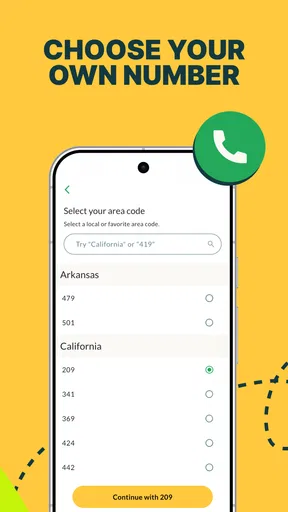
textPlus is a free app that lets you send unlimited texts and make calls without the hefty phone bill. Available on both Android and iOS, it’s a lifesaver when you're traveling, your data plan is running low, or you just want to keep your primary number private. You get a free phone number in the US or Canada, making it a solid choice for anyone looking to cut down on their mobile expenses.
Setting Up and Getting Started
Getting started with textPlus is super easy. Once you download the app, you’ll quickly be guided through the setup process. Just create an account using your email or Facebook login, and you're ready to go. The app immediately assigns you a free phone number, and you can start texting or calling right away. One thing to keep in mind is that calls to non-textPlus users might incur charges, but they are pretty minimal.
The User Experience
From a user’s perspective, the interface is straightforward and easy to navigate. The home screen displays your recent conversations, and starting a new message or call is just a tap away. I love how the app keeps everything organized, so you're not digging through endless menus to find what you need. Plus, there’s a handy feature that synchronizes your contacts, making it seamless to connect with friends and family.
For a less confusing setup, I’d decide in advance which contacts should receive the app number and which should continue using my regular number. That simple boundary helps prevent replies from landing in the wrong conversation and makes the second line more useful rather than just another inbox to check. If you share your phone with someone else, or often hand it over to a child, I’d also consider whether messages on either line might be visible in the same device environment.
Features That Stand Out
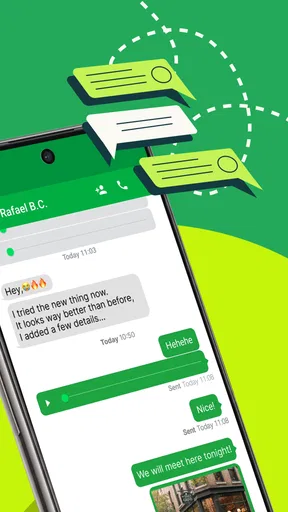
One of the coolest features is the group texting option. You can create group chats and keep everyone in the loop without any hassle. It’s perfect for planning events or just catching up with your circle. Also, the app supports multimedia messages, so sharing photos, videos, and emojis is a breeze.
For a practical group workflow, I’d use a thread for information that everyone needs—such as a meetup time or a change of location—rather than letting several separate conversations drift out of sync. The trade-off is that group chats can become noisy, especially when people reply to every message. If a detail matters, I’d send it plainly and ask the group to confirm, rather than assuming everyone has noticed it among other replies.
Another feature worth mentioning is the voicemail service. It works just like your regular voicemail, allowing you to listen to your messages directly from the app. And guess what? You can even customize your voicemail greeting, adding a personal touch to your communication.
A customized greeting is especially helpful if you use the number for a specific purpose: it can tell callers they have reached the right line and set a sensible expectation about when you will respond. I would keep the greeting brief and avoid including personal details that do not need to be shared. If you are separating casual contacts from your main number, a clear greeting can make that boundary feel intentional rather than confusing.
A Few Quirks
While textPlus is generally smooth sailing, there are a few hiccups. The app is ad-supported, so you might encounter some ads popping up now and then. They’re not overly intrusive, but it’s something to be aware of if you’re easily distracted by ads. There’s also an option to remove ads by opting for a premium subscription, which could be worth considering if you’re a frequent user.
That matters more than it might seem if you use the app in short, repeated bursts. A person who checks messages only now and then may barely notice the interruptions, while someone who opens it throughout the day may find them more distracting. I’d use the app for a while before deciding whether a paid option is worthwhile, rather than paying simply because I expect to need a second number occasionally.
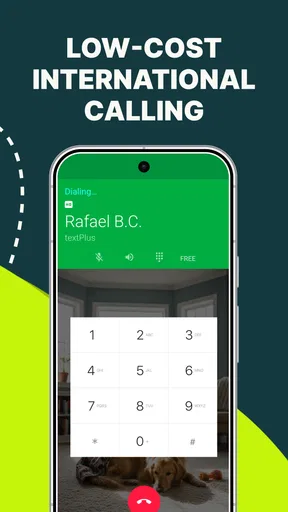
Another minor downside is that the call quality can vary depending on your internet connection. If you’re on a stable Wi-Fi network, you should be fine, but it can get a bit choppy if your connection is shaky.
For important conversations, I’d make a quick test call from the place where I expect to use the app. If the connection sounds poor, switching to a more reliable calling option is sensible; no second-number convenience can compensate for missed words in a medical appointment, a job discussion or an urgent family call. I would also avoid treating app-based calling as my only fallback when travelling through areas with unreliable internet access.
Where it fits—and where it doesn’t
The usual alternatives solve different problems. A carrier plan is the more natural choice when you need a dependable line that works beyond Wi-Fi, while a messaging service tied to your existing number may be simpler if you only want to chat with people who already use that service. textPlus sits between those options: it can provide a separate number and familiar calling and texting, but the internet connection and its own app experience remain part of the equation.
I’d recommend it to someone who wants a low-cost extra line for casual communication, short-term coordination or keeping a personal number less exposed. I would skip it as a sole line for a person who must always be reachable, dislikes ad-supported apps, or needs communication to work reliably in places with weak internet. It is also not the best fit if everyone they contact already uses one preferred messaging service and there is no real need for a second number.
Who benefits from keeping it installed?
The developer is textPlus, and the app has an average rating of 4.1 from around 541,000 ratings, with more than 100,000 written reviews. It has passed 50 million installs, which suggests that the second-number idea has broad appeal, though popularity alone does not tell me whether it suits a particular person’s routine. I’d focus instead on whether its combination of messaging, calls and a separate number solves a problem I actually have.
It is free, rated for Everyone, and version 8.3.6 requires Android 7.0 or later. Those details make it accessible to many Android users, but age suitability does not replace a family’s own judgement about who should have a separate communication account. For younger users, I’d agree on who can be contacted, what the number is for and how to handle unexpected messages before setting it up.
The Final Word
All in all, textPlus is a fantastic app for anyone looking to cut down on communication costs while keeping things simple and efficient. It’s packed with features that make texting and calling a breeze, and the fact that it’s free makes it even more appealing. Sure, it has its quirks, but the benefits far outweigh them. Give it a try, and you might find it becoming your go-to app for texting and calling without breaking the bank.
My more measured recommendation is to think of it as a useful second channel, then test it in the places and situations where you expect to use it. Set expectations with contacts, try the call and voicemail experience, and decide whether ads and internet dependence fit your habits. For the right person, that extra separation is genuinely handy; for someone who needs an always-available primary line, a standard carrier option is the safer everyday choice.
Privacy and Permissions
See what permissions an app requests and how it handles your data.
- Contacts
- read your contacts, modify your contacts
- Location
- approximate location (network-based), precise location (GPS and network-based)
- Phone
- directly call phone numbers, read phone status and identity
- Photos/Media/Files
- read the contents of your USB storage, modify or delete the contents of your USB storage
- Storage
- read the contents of your USB storage, modify or delete the contents of your USB storage
- Camera
- take pictures and videos
- Microphone
- record audio
- Wi-Fi connection information
- view Wi-Fi connections
- Device ID & call information
- read phone status and identity
- Other
- view network connections, pair with Bluetooth devices, access Bluetooth settings, send sticky broadcast, allow Wi-Fi Multicast reception, disable your screen lock, full network access, change your audio settings, control Near Field Communication, run at startup, draw over other apps, control vibration, prevent device from sleeping, Google Play license check, read Google service configuration
Verdict
Strengths of textPlus: Text Message + Call
- Free texting to any US or Canadian number.
- Multiple phone numbers on one device.
- Supports group messaging efficiently.
- Offers a simple and clean interface.
- Reliable call quality and connection.
Limitations of textPlus: Text Message + Call
- Contains in-app advertisements.
- Limited international calling options.
- Requires Wi-Fi or data for functionality.
- Some features behind a paywall.
- Occasional app crashes reported.
Other Releases by textPlus
View All
Nextplus: Phone # Text + Call
Communication4.2
Similar Picks in This Category
View All
Meta Platforms, Inc.4.6

Instagram4.0

Likee-Live, Chat & Party Games
Likeme Pte. Ltd.4.4

Facebook Lite
Meta Platforms, Inc.4.5

TikTok - Videos, Shop & LIVE
TikTok Pte. Ltd.4.0

Moj: Free Short Drama & Reels
ShareChat4.1
You May Also Like
View All
Frequently Asked Questions
What is textPlus and how does it work?
textPlus is a communication app that allows users to send text messages and make calls over Wi-Fi without needing a mobile plan. It provides users with a free phone number, enabling them to stay connected with friends and family. The app is ideal for those looking to save on carrier charges by using internet connectivity for communication.
Is textPlus free to use, and are there any in-app purchases?
Yes, textPlus is free to download and use. It offers free texting to any US or Canadian number. While the app includes ads, users can opt for an ad-free experience through a monthly subscription. Additionally, international calls and some other features may require credits, which can be purchased within the app.
How reliable is the call quality on textPlus?
Call quality on textPlus is generally reliable, especially when connected to a strong Wi-Fi network. However, users might experience varying quality depending on their internet connection. It’s important to ensure you have a stable and fast connection to achieve the best possible call clarity and avoid dropped calls.
Can I use textPlus on multiple devices?
Yes, textPlus can be used on multiple devices. You can log in using the same account on different devices, allowing seamless access to your messages and calls. However, ensure you have a strong internet connection on each device for optimal performance. This feature is particularly useful for users who want to stay connected across multiple platforms.
Is my information secure on textPlus?
textPlus takes user privacy and security seriously. The app uses standard encryption protocols to protect your data during transmission. However, as with any app, users should be mindful of the information they share and ensure that their account credentials are kept secure by using strong, unique passwords.
